
Guides Recording activities
Recording activities
How DerbyOn tracks a walk, run or ride — and why the distance it credits is sometimes a little different from what your phone showed.
Starting a session #
Tap the play button in the middle of the bottom bar, then START ACTIVITY.
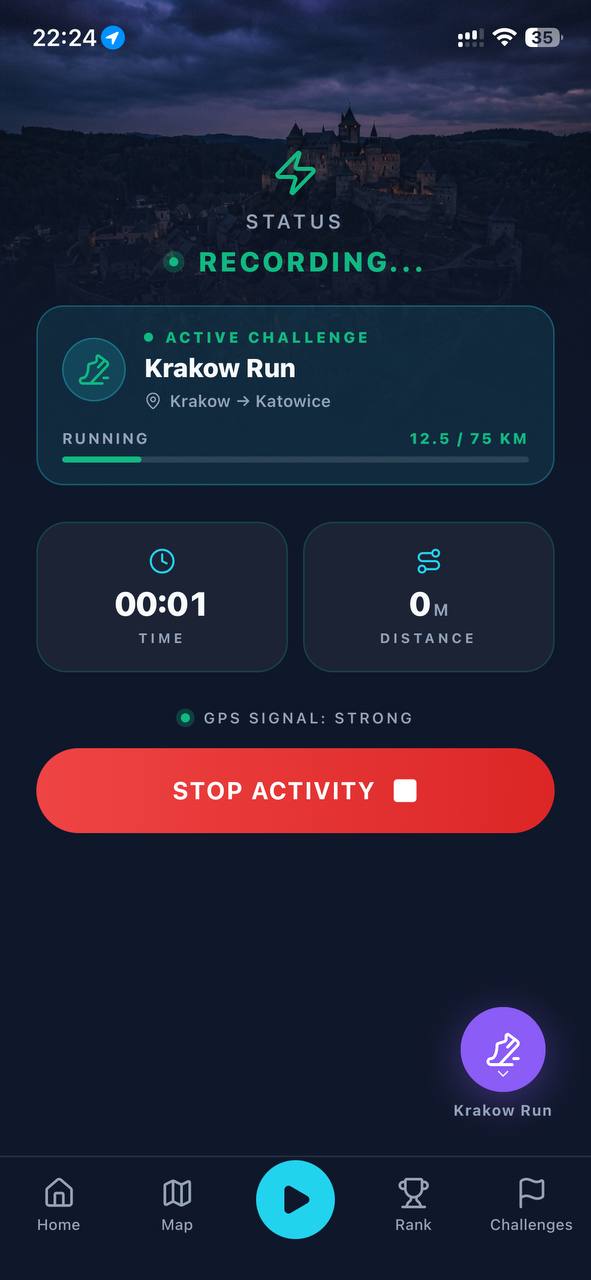
Before you start, the screen tells you two things:
- STATUS — READY, WAITING, STARTING… or RECORDING….
- GPS SIGNAL — STRONG, WEAK, OFF, or GPS ACCESS NEEDED if the permission is missing.
Solo or for a challenge #
Every session is recorded either for a challenge or as a solo activity.
| Solo session | Challenge session | |
|---|---|---|
| Pick the activity | Yes — you choose | No — set by the challenge |
| Counts toward lifetime distance | Yes | Yes |
| Earns XP | Yes | Yes |
| Builds streaks and records | Yes | Yes |
| Moves you along a route | No | Yes |
| Affects the leaderboard | No | Yes |
Use the floating button above the tab bar to switch between Solo and your active races before you start recording.
What you see while recording #
- TIME — elapsed time, as H:MM:SS.
- DISTANCE — in metres below a kilometre, then kilometres.
- Your challenge — name, route and progress, if you're recording for one.
- GPS signal — so you know whether it's still tracking well.
On the Map tab you also get your live position, the route ahead, how far is left, nearby rivals, your rank, and checkpoints as you reach them.
Recording with your phone locked #
You don't need to keep the app open, and you shouldn't have to keep the screen on. Once a session is running you can lock your phone and put it in a pocket — recording continues.
- On iPhone, a Live Activity shows distance, time and the challenge on your lock screen, with a stop button.
- On Android, an ongoing notification does the same.
Recording without signal #
Losing mobile data doesn't stop anything. GPS works without a network connection, so DerbyOn keeps recording and shows a banner telling you it's tracking offline.
Your location points are queued on the phone and sent with their original timestamps when you're back online, so nothing is lost and nothing is misdated.
What counts, and what doesn't #
DerbyOn checks every session, because a racing app only works if everyone's distance was actually earned. This runs automatically — there's nothing to turn on.
Your recording is examined in small segments, and only genuine movement for your activity earns distance and XP. Segments are not counted when:
- the GPS fix is too inaccurate to trust
- you're standing still, or the movement is just GPS drift on the spot
- the speed or acceleration is beyond what's physically plausible for walking, running or cycling
- the pattern looks like a car, bus or train rather than your own effort
- your position jumps an impossible distance, or there's a long gap in the data
- it's in the first few seconds while the GPS is still settling
This is also why the distance credited to a challenge can be a little lower than the live figure on your phone: the phone shows a running estimate, and the final number is confirmed afterwards against the whole session.
Flagged sessions #
Occasionally a session is marked Flagged, and you may get a notification saying it needs review. It usually means part of the recording looked like vehicle travel or contained a GPS glitch.
A flag is not a penalty and it doesn't wipe your session. Crediting is worked out segment by segment, so a single bad stretch doesn't destroy the genuine movement around it. A dropped GPS fix on a train bridge shouldn't cost you an hour's walk, and it doesn't.
If you think a session was flagged wrongly, email us at muhshuh2000@gmail.com with the date and roughly where you were.
Limits worth knowing #
| Limit | Value |
|---|---|
| Shortest session that will save | 30 seconds |
| Longest single session | 12 hours |
| Longest single session distance | 500 km |
| Sessions running at once | One |
| Forgotten sessions | Closed automatically after 24 hours, and earn no XP |